#1 Overall Winner
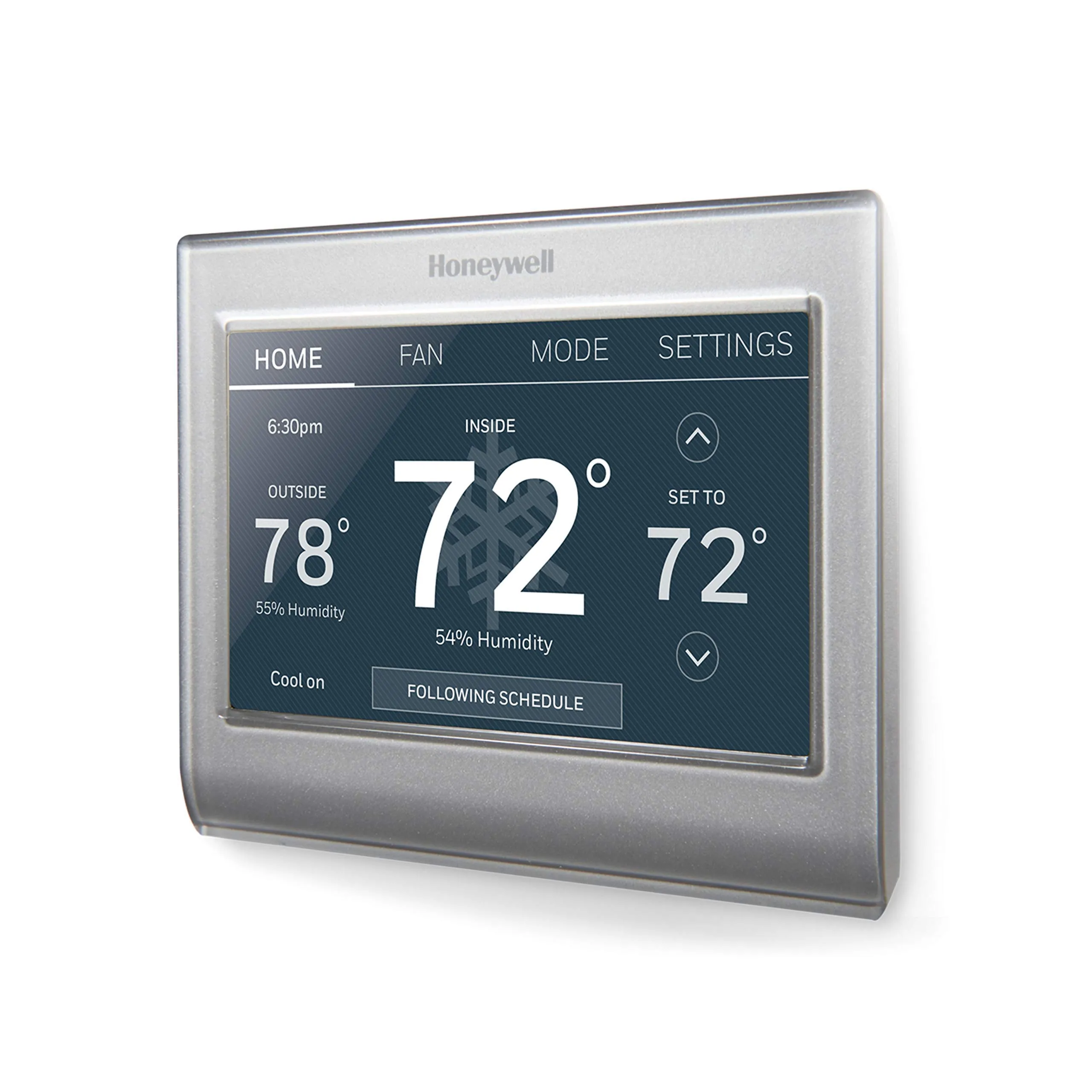
Honeywell Home RTH9585WF1004 Wi-Fi Smart Color Thermostat
- Wi-Fi connected thermostat with remote control via mobile app and web access
Comparison
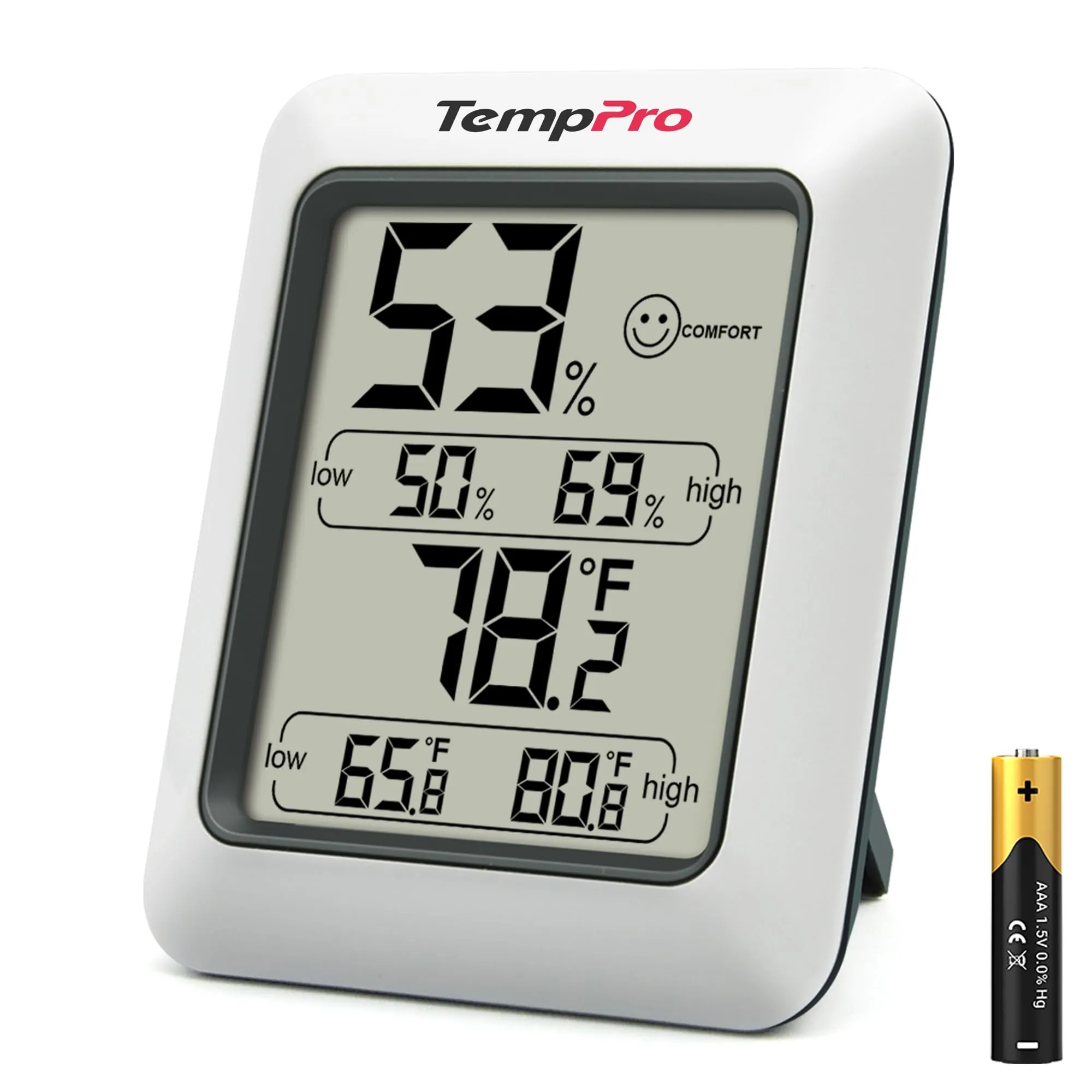
The Honeywell Home RTH9585WF1004 and TempPro TP50 both help you understand indoor comfort, but they serve very different roles. Honeywell is a Wi‑Fi smart thermostat that controls compatible heating and cooling systems with scheduling and voice/app control. TempPro TP50 is a compact temperature and humidity monitor that’s easy to place anywhere, but it doesn’t control HVAC.
#1 Overall Winner
Contender
Choose the Honeywell Home RTH9585WF1004 if you want to control your HVAC from your phone or via Alexa/Google Home, and your system is compatible (including a C-wire). Choose the TempPro TP50 if you just need a low-cost, easy-to-read temperature/humidity display you can place anywhere to diagnose dryness or dampness.
Overall winner
Depends on your needs
| Feature | Honeywell Home RTH9585WF1004 Wi-Fi Smart Color Thermostat | TempPro TP50 Digital Hygrometer Indoor Thermometer | Winner |
|---|---|---|---|
| Product type | Wi‑Fi smart thermostat (HVAC control) | Digital thermometer/hygrometer (monitor only) | Depends |
| Primary job | Controls heating and cooling schedules and setpoints | Displays temperature and humidity readings | Depends |
| Smart home support | Alexa and Google Home support; app/web control | Not smart home compatible | Honeywell Home RTH9585WF1004 Wi-Fi Smart Color Thermostat |
| Connectivity | Wi‑Fi | None | Honeywell Home RTH9585WF1004 Wi-Fi Smart Color Thermostat |
| Automation & scheduling | 7‑day programmable; holds; auto changeover | No scheduling; stores high/low records | Honeywell Home RTH9585WF1004 Wi-Fi Smart Color Thermostat |
| Humidity information | Shows humidity and can send humidity-related alerts | Measures humidity and shows DRY/COMFORT/WET plus high/low | Depends |
| Installation effort | Wall install; C‑wire required; setup can be fiddly | Battery insert and place; magnet/stand | TempPro TP50 Digital Hygrometer Indoor Thermometer |
| Portability | Wall-mounted | Pocketable/room-to-room; magnetic back | TempPro TP50 Digital Hygrometer Indoor Thermometer |
| Space efficiency | Compact wall footprint | Very compact desktop/fridge placement | TempPro TP50 Digital Hygrometer Indoor Thermometer |
| App experience | App available (some users want more options) | No app | Honeywell Home RTH9585WF1004 Wi-Fi Smart Color Thermostat |
| Compatibility limits | Not for electric baseboard (120–240V); check HVAC type and C-wire | Works as a standalone monitor in many locations | TempPro TP50 Digital Hygrometer Indoor Thermometer |
| Value for money (based on price + feedback) | Higher cost; value feedback is mixed | Low cost; value feedback is strongly positive | TempPro TP50 Digital Hygrometer Indoor Thermometer |
| Customer satisfaction (based on rating volume/sentiment) | Strong volume; generally positive with some mixed reliability/value notes | Very large volume; broadly positive with durability caveats | TempPro TP50 Digital Hygrometer Indoor Thermometer |
| Long-term durability (based on reviews) | Mixed reliability reports; install-related issues noted | Multiple reports of failure after months | Depends |
For everyday home use, these products fit different routines. The Honeywell thermostat becomes part of your home’s “comfort infrastructure” by controlling heating and cooling on a schedule and letting you adjust settings remotely. The TempPro TP50 is more of a diagnostic tool: it helps you spot dry rooms, damp basements, or temperature swings, and it’s easy to move around the home to compare spaces.
Both products support climate comfort, but in different ways. The Honeywell directly affects comfort by controlling heating and cooling and by offering scheduling, holds, and auto heat/cool changeover. It also surfaces indoor humidity and can notify you about extreme conditions. The TempPro improves comfort indirectly by helping you monitor humidity and temperature so you can decide when to run a humidifier, dehumidifier, or adjust airflow. If comfort problems vary by room, TempPro’s portability can be a practical advantage.
For its primary job—controlling HVAC—Honeywell performs as a capable smart thermostat with features like auto changeover and Smart Response-style behavior described in the listing, and many reviews report accurate temperature control and dependable day-to-day operation. However, performance can be impacted by installation challenges and compatibility constraints (such as needing a C-wire and not supporting certain electric baseboard setups).
TempPro’s performance is about measurement: buyers commonly report readings that track closely to other devices and like the fast updates and max/min records. It won’t improve temperature or humidity on its own, but it can help you make better adjustments with other equipment.
Reliability feedback is more mixed for the Honeywell thermostat than for the TempPro monitor. Many owners report stable operation and dependable connectivity, but there are also reports of units not functioning properly, plus installation-related pitfalls (like delicate terminals) that can cause problems if wiring isn’t seated correctly. TempPro is commonly described as dependable day to day and accurate, but its reliability risk shows up later: multiple customers report the device stopping after around six months, even though others report years of use. Your tolerance for potential early failure vs installation complexity should guide the choice.
Honeywell is the true climate-control device here: it’s built to control compatible heating and cooling systems (including heat pumps with electric backup, per the listing) and can automatically switch between heating and cooling. TempPro provides climate visibility rather than control, measuring temperature and humidity with frequent updates and tracking extremes. If you want to stabilize the whole home through HVAC control, Honeywell is the better fit; if you’re troubleshooting humidity swings or temperature variations room by room, TempPro is a practical companion.
Neither product raises major safety concerns in the provided data, but there are practical considerations. The Honeywell thermostat is tied into HVAC wiring and requires correct installation and compatibility (including C-wire requirements and system-type limitations), so following the manual matters to avoid miswiring or unstable behavior. TempPro is a low-voltage, battery-powered monitor that’s generally low risk, though any small device should be kept out of reach of young children due to the battery. For both, placing them away from moisture and avoiding exposure to water will reduce problems.
Honeywell can improve comfort more directly because it can automatically maintain set temperatures through scheduling, holds, and auto heat/cool changeover. It also adds convenience through remote control and voice commands, which can reduce day-to-day fiddling. TempPro supports comfort by making room conditions visible (including dry vs comfortable vs wet), helping you decide when to adjust HVAC settings or run humidity equipment. If your comfort issues are room-specific, TempPro’s portability can be especially helpful.
TempPro is the easier device for most people: insert the AAA battery and it starts working, with a clear display and minimal controls. Honeywell is easy once installed—many users find the touchscreen and menus intuitive—but the initial setup can take longer due to wiring, C-wire requirements, Wi‑Fi connection, and account registration. Several reviewers recommend using the full manual for less common wiring scenarios.
Honeywell’s design is centered on an in-wall display experience: a bright, easy-to-read touchscreen with a customizable color background intended to blend with décor. TempPro’s design is minimal and practical, prioritizing a readable screen and easy placement with a stand or magnet. If you want a “set-and-forget” wall control panel, Honeywell fits; if you want a small monitor you can reposition around the home, TempPro is more flexible.
Both are space-efficient, but in different ways. Honeywell uses wall space and keeps countertops clear, with a slim profile for a thermostat. TempPro is extremely compact and can live on a shelf or stick to a fridge, which is helpful in small flats, dorms, or crowded utility areas. If you want zero countertop footprint, Honeywell’s wall mount helps; if you need flexible placement in tight spots, TempPro is easier.
Neither product is meaningfully “noisy” in normal use because they don’t rely on loud motors or fans. Honeywell is a wall-mounted control interface, while TempPro is a passive monitor, so both are well-suited to bedrooms and offices from a noise standpoint.
Installation is where these diverge most. The TempPro TP50 is essentially instant: insert the included AAA battery and place it using the stand or magnet. The Honeywell is a wired wall thermostat that requires compatibility checks and a C-wire, and reviewers describe the wall-plate wiring as delicate and sometimes frustrating in tight spaces. Wi‑Fi setup and account registration can also add time. If you want the least setup effort, TempPro wins easily.
Both products use plastic housings, and buyers generally describe each as solid enough for everyday use. Honeywell’s wall-mounted build includes wiring terminals that some reviewers describe as delicate, which can affect the installation experience. TempPro feels sturdy for its size, but durability is more questioned in long-term use, with multiple customers reporting it stopped working after months.
Honeywell’s durability outlook is tied to being a fixed, powered wall device, but reviews still include some concern around long-term reliability and fragile-feeling wire terminals during installation. TempPro’s small, battery-powered design is easy to live with, yet durability is the bigger caution point—multiple buyers mention failures after several months. If you want fewer long-term durability complaints in the review patterns provided, Honeywell appears steadier, but it comes with more install sensitivity.
TempPro maintenance is minimal: occasional battery replacement and basic cleaning of the exterior. Honeywell maintenance is also light day to day, but it adds “maintenance management” through reminders (like filter and humidifier pad change prompts) and alerts, which can help you keep HVAC-related tasks on schedule. Honeywell may also require occasional app/account attention (such as re-connecting Wi‑Fi if networks change), while TempPro avoids software maintenance entirely.
The TempPro TP50 is far more portable: it’s lightweight, battery powered, and designed to sit on a surface or attach magnetically to appliances or metal surfaces. The Honeywell thermostat is wall-mounted and intended to stay in one location as part of the home’s HVAC system. For checking different rooms or moving between a greenhouse, basement, and bedroom, TempPro is the better fit.
Honeywell is feature-rich: scheduling options, holds (including vacation), app/web control, voice assistant support, weather views, fan control modes, and alerts/reminders for maintenance and extreme conditions. TempPro keeps features focused on monitoring: current temperature/humidity, high/low records, a comfort icon, and °F/°C switching, plus flexible placement with a stand and magnet. If you want automation and controls, Honeywell leads; if you want simple, readable monitoring without setup overhead, TempPro is more straightforward.
Only Honeywell offers an app experience. Reviews are generally positive about controlling the thermostat from a phone, but some users wish certain features (such as vacation-style settings) were easier to access without going to the wall unit. TempPro has no app, so there’s nothing to configure or maintain—just the on-device display.
The Honeywell Home RTH9585WF1004 is designed for smart homes: it connects via Wi‑Fi and works with Amazon Alexa and Google Home, allowing voice and remote adjustments. The TempPro TP50 is intentionally simple and not smart home compatible, with no app, Wi‑Fi, or integrations. If you want routines and remote control, Honeywell is the clear fit; if you want a standalone display with no accounts or connectivity, TempPro is simpler.
Honeywell is designed to be part of a connected setup, supporting Alexa and Google Home plus app/web access for adjusting temperature away from home. It also offers alert-style features (like reminders and extreme condition notices) that can be useful for busy households. TempPro has no automation, routines, or integrations; its simplicity is the point. If you want smart routines and remote control, Honeywell is the clear choice; if you want zero connectivity and no accounts, TempPro stays simple.
Honeywell supports practical automation through programmable schedules, holds, and automatic heat/cool changeover, which helps reduce manual adjustments. TempPro does not automate anything; it records and displays readings, including high/low history, so you can make decisions yourself. If hands-off temperature management matters, Honeywell is the better match.
Honeywell connects over Wi‑Fi and relies on an account/app/web access for remote control; reviews generally describe Wi‑Fi and Alexa integration as working well, though some mention setup taking time. TempPro has no connectivity at all—no Wi‑Fi, Bluetooth, or hub needs—which can be an advantage if you want a purely local device with no pairing or network dependencies.
Honeywell’s efficiency advantages come from smarter control—programmable scheduling, holds, and energy reporting to help manage heating and cooling use over time. TempPro doesn’t control energy use directly, but it can improve operating efficiency indirectly by helping you avoid over-humidifying or over-heating rooms based on real readings. If you want your device to actively manage consumption, Honeywell has the edge; if you want inexpensive guidance for manual adjustments, TempPro can still help.
Privacy considerations apply mainly to the Honeywell because it uses Wi‑Fi and remote access via app/web, which typically involves account registration. If you prefer to avoid connected devices or cloud-linked control in your home, that can be a drawback. The TempPro TP50 does not connect to the internet, has no app, and stores readings locally on the device, which limits data exposure by design.
The TempPro TP50 offers very strong value for money based on its low price, huge number of reviews, and frequent praise for accuracy, readability, and usefulness in everyday monitoring. The main value risk is durability, since some owners report failures after months.
The Honeywell thermostat costs more, but it’s also a different class of product: it can control HVAC equipment, adds scheduling and smart home integration, and includes alerts and energy reporting features. Value sentiment is mixed—some buyers feel it’s worth it, others find it overpriced—so it tends to be best value when you’ll actually use the connected features and your wiring is compatible.
Honeywell Home is presented as an established thermostat brand with clear compatibility guidance and an ecosystem (app/web control), and reviewers commonly reference replacing older thermostats with it. TempPro (previously ThermoPro) appears widely used with very high review volume and a consistent “simple and works” reputation for monitoring. The trust trade-off is that Honeywell’s connected features add complexity (accounts, Wi‑Fi), while TempPro’s trust question is more about long-term durability consistency across units.
Both products have strong overall ratings and large review counts, but the tone differs. Honeywell buyers often praise usability, screen readability, Wi‑Fi/Alexa compatibility, and the convenience of remote control. The recurring negatives include installation friction (especially wiring terminals), some app limitations, and mixed reliability/value feedback.
TempPro buyers strongly praise ease of use, readability, and perceived accuracy, and many call it excellent value. The most repeated complaint is durability, with multiple customers reporting it stopped working after about six months, even though many others report long-running units.
This matchup is less about which product is “better” and more about what you’re trying to accomplish. The Honeywell Home RTH9585WF1004 is the stronger choice when you need real HVAC control: it brings Wi‑Fi access, voice assistant support, flexible programming, and helpful reminders/alerts. Its biggest drawbacks are compatibility and setup friction (C-wire requirement, delicate wiring terminals) plus mixed reliability/value feedback.
The TempPro TP50 is a standout for simple temperature and humidity monitoring: it’s compact, readable, quick to deploy, and widely praised as good value. Its main limitation is that it can’t control anything—and durability is the key concern in buyer feedback, with some devices failing after months. Choose Honeywell for control and automation; choose TempPro for low-cost, portable visibility.
Overall winner
Depends on your needs
They solve different problems. The Honeywell Home RTH9585WF1004 is a full thermostat designed to control compatible heating and cooling systems with scheduling, app access, and voice assistant support. The TempPro TP50 is a simple indoor thermometer/hygrometer that monitors temperature and humidity but cannot control your HVAC. Choose based on whether you need control or just measurement.
No. The TempPro TP50 is a temperature and humidity monitor only. It displays current readings and tracks high/low records, but it does not connect to HVAC equipment, does not offer scheduling, and has no app or smart home integration. If you need to adjust heating/cooling automatically, you’ll want a compatible thermostat like the Honeywell.
Yes, the product details state a C-wire is required. Before buying, it’s worth confirming your existing thermostat wiring and HVAC compatibility. Reviews also mention that setup can take some finesse at the wall plate, so checking wiring and having the manual handy can reduce frustration during installation.
The TempPro TP50 is typically easier: insert the included AAA battery, place it on a surface or use the magnet, and it starts showing readings. The Honeywell thermostat is a wired wall installation and may require Wi‑Fi setup and account registration. Reviews describe the wiring terminals as delicate, so installation can be more involved.
For simple humidity troubleshooting, the TempPro TP50 fits well because it shows humidity at a glance, includes a dry/comfort/wet indicator, and stores high/low records. The Honeywell can display humidity and provide alerts and reminders, but it’s primarily meant to control HVAC rather than being a portable sensor you can move around to compare rooms.
The Honeywell Home RTH9585WF1004 supports voice control and is described as working with Amazon Alexa and Google Home, in addition to app and web control. The TempPro TP50 is listed as not smart home compatible and does not offer Wi‑Fi, apps, or integrations.
Buyer feedback is mixed for the Honeywell thermostat: many report it works well, but there are also reports of units not functioning properly, and installation issues can contribute to early problems. For the TempPro TP50, many customers praise accuracy and value, but multiple reviews mention the device stopping after several months, which is the main durability concern.
If you just want a small device to read temperature and humidity, the TempPro TP50 is compact, portable, and easy to place on a desk or fridge. If you want to actually control heating and cooling in that space, the Honeywell makes more sense—but only if the space’s HVAC wiring and system type are compatible and you’re comfortable with a wall installation.
Check our rankings and expert guides to find the best home lifestyle products for your goals.