HouseholdRanker
Menu

Review

Dragon Touch 10.1'' WiFi Digital Picture Frame Review

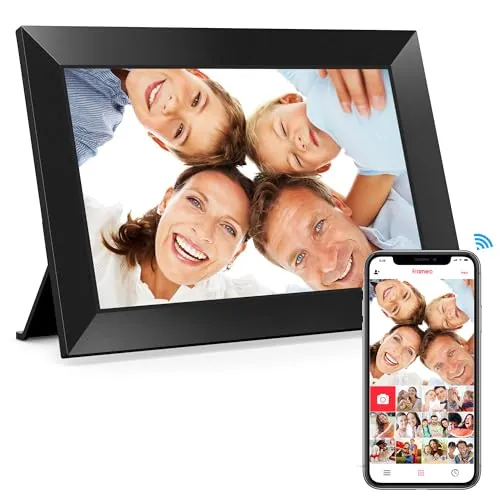
The Dragon Touch 10.1-inch Wi-Fi digital picture frame is a home display gadget built for sharing family photos and short videos from a phone to a dedicated frame. It stands out for its clear screen, simple setup and gift-friendly appeal, though the app and photo management experience appear more limited than the display hardware itself.
Expert reviewed
84
Overall score
Data-driven scoring Expert reviewed Updated analysis

Why we ranked it highly

The Dragon Touch 10.1-inch Wi-Fi Digital Picture Frame is a corded digital photo display designed for homes that want a simple way to keep family pictures visible and regularly updated. It combines a 10.1-inch IPS touch screen, auto-rotate support, built-in storage, and wireless photo sharing through a companion app, while also allowing transfers by SD card and USB. In practical use, it appears aimed at households that want a dedicated frame for living rooms, kitchens, bedrooms, or gifting to parents and grandparents. Review feedback strongly supports its appeal as a family-focused product, especially for relatives living apart. The main trade-off is that its software experience seems less polished than the hardware, with some users noting awkward photo organisation, basic app design, and 2.4 GHz-only Wi-Fi support.
90-day review Expert reviewed User feedback Data scoring

Key specs

Features & Specs

Resolution
1080p
Compatible Devices
Smartphone
Connectivity Technology
Wi-Fi
Power Source
Corded Electric
Touchscreen
Touchscreen
Aspect Ratio
16:9
Memory Storage Capacity
16 GB
Control Method
Touch
Smart Home Compatibility
Not Smart Home Compatible

Additional details

Color
Black

Item details

Brand
Dragon Touch
Model Number
Classic 10 Elite
UPC
850045550851
Manufacturer
Dragon Touch
Manufacturer Part Number
Modern 10 Charm

Measurements

Display Size
10.1 Inches
Item Dimensions L x W
10.3"L x 7.1"W

Scores breakdown

86 /100

Performance

78 /100

Features

84 /100

Safety

85 /100

Comfort

88 /100

Ease of use

75 /100

Space efficiency

100 /100

Noise

79 /100

Design

Strengths

  • Clear 10.1-inch IPS touch display with a sharp 1280x800 presentation for photos and videos.
  • Easy setup and straightforward daily use, with many reviews highlighting simple photo sharing.
  • Wi-Fi photo and video sharing through the app helps families send updates remotely.
  • Auto-rotate support makes portrait and landscape placement more flexible.
  • Built-in storage plus SD card and USB support adds extra flexibility for local file transfer.
  • Strong customer feedback for gifting, especially for parents and grandparents.
  • Competitive pricing relative to the display quality and connected sharing features.

Limitations

  • Works on 2.4 GHz Wi-Fi only, which may complicate setup on some home networks.
  • App experience appears basic, with some users reporting weak organisation and dated design.
  • Photo management can become cumbersome when the library grows large.
  • Not smart home compatible, so it does not integrate into wider home automation systems.
  • Needs constant power, which reduces placement flexibility and can make wall mounting less tidy.
  • Some review feedback mentions language and interface inconsistencies in the app or menus.
  • Storage claims in the listing are inconsistent, with both 16GB and 32GB mentioned.

Ideal user profiles

  • Families who want to send photos remotely to parents or grandparents.
  • Buyers looking for a simple digital frame gift with Wi-Fi sharing.
  • Home users who want a dedicated display for family photos in living rooms or kitchens.
  • People who prefer touch controls over more complex smart home setup.

Use cases

  • Displaying rotating family photos in a living room, hallway, or kitchen.
  • Sending recent pictures to grandparents or relatives who live far away.
  • Using as a gift for birthdays, weddings, Mother's Day, or family milestones.
  • Showing portrait or landscape images on a shelf, table, or stand.
  • Loading photos locally by SD card or USB for users who prefer manual transfers.
  • Playing short videos alongside photo slideshows.

Fit and positioning

Who this works for

Category positioning

This product sits in the lifestyle gadget and general home display category rather than smart home. Its main role is to bring digital photos into everyday household routines without needing a tablet or television. For many buyers, it functions as a connected family photo frame that can sit on a table, shelf, or kitchen counter and quietly rotate through shared memories throughout the day.

Best for

This frame is best suited to families who want an easy, affordable way to share photos remotely with parents, grandparents, or relatives in another home. It also fits buyers who care more about screen clarity, touch controls, and straightforward setup than advanced smart home integration or deep media management tools. As a gift item, it appears especially well matched to users who want a simple experience once installed.

Not best for

It may be less suitable for buyers who want polished software, advanced organisation tools, or broad compatibility with modern smart home systems. Users with dual-band network setups may need to check 2.4 GHz access first, and anyone planning a tidy wall-mounted installation should consider the constant power cable and rear bulk. Large photo libraries may also be harder to manage over time.

Home use

In everyday home use, this frame works as a dedicated display for family photos, milestone moments, and shared updates. It is particularly suited to common areas such as kitchens, living rooms, or hallways where people can casually see new pictures throughout the day. The remote sharing function gives it a clear role in keeping relatives connected without needing to handle a phone or computer regularly.

Performance analysis

How it performs in practice

Each scoring dimension is separated into a compact card so the strengths and tradeoffs are easier to compare without reading one long block.

Performance analysis

For its main job of displaying family photos clearly and receiving new images remotely, the Dragon Touch frame appears to perform well. Review feedback strongly supports the quality of the display, with repeated comments about sharpness, clarity, and attractive presentation in the home. Wireless sharing is also a meaningful part of its practical value, especially for gifting and family use. Performance is less convincing on the software side, where some users describe the app as basic and photo organisation as awkward once many files build up. Overall, it seems effective as a digital frame first, but less refined as a media management platform.

Feature analysis

The feature set covers the essentials expected in a Wi-Fi photo frame: touch control, auto-rotate, portrait or landscape placement, remote photo and video sharing, built-in storage, and SD/USB support. Sleep mode and brightness adjustment also add practical day-to-day flexibility. The main limitation is that the connected experience looks fairly basic, with no smart home compatibility and some app constraints that reduce the usefulness of the wireless features for more demanding users.

Safety

Safety considerations appear fairly routine for a small corded home display. There is no supported evidence here of major overheating or electrical faults, which is reassuring, but buyers should still place it securely and manage the power cable carefully, especially in homes with children or pets. For wall mounting, safe cable routing and stable positioning matter more than with a simple tabletop setup. Because the product is intended to remain plugged in, outlet location and placement stability should be part of the purchase decision.

Comfort

This frame's comfort value comes from convenience and emotional use rather than physical comfort features. It helps keep family photos visible in shared spaces and can make a room feel more personal without requiring active interaction. For households using it to stay connected with relatives, the remote sharing function adds a sense of regular contact that many buyers clearly appreciate.

How it compares

Within the digital picture frame category, this Dragon Touch model appears stronger on ease of setup, display clarity, and gift-friendly day-to-day use than on advanced software polish. It looks especially competitive for buyers who want remote sharing and a touch screen without paying for a more premium ecosystem. Compared with stronger connected devices in the broader home display space, it is clearly more limited in smart home integration and app sophistication. Its position is helped by a solid mix of practical features and attractive pricing, but buyers who care most about deep media organisation or ecosystem compatibility may view it as more basic than category leaders.

Ranking summary

This product ranks well because it gets the core digital frame experience right for a large number of buyers. Its strongest advantages are display quality, simple setup, family-friendly remote sharing, and broad customer satisfaction at a relatively accessible price. It is not ranked at the very top of its type because the software side appears less polished, with some limitations around app quality, file organisation, and network compatibility. Even so, for households wanting a straightforward Wi-Fi frame rather than a deeply integrated smart display, it looks like a dependable and practical option with strong gift appeal.

Buying advice

Consider this frame if your main goal is simple photo sharing for family use, especially for parents or grandparents who want an easy display rather than a complex smart device. It is also a sensible choice if screen quality, touch controls, and value matter more than advanced software. Before buying, check that your home network supports 2.4 GHz Wi-Fi, think about where the power cable will run, and decide whether shelf placement or wall mounting makes more sense. If you expect heavy photo organisation, highly polished app tools, or smart home integration, this may not be the best fit.
84
Overall score

Final verdict

The Dragon Touch 10.1-inch Wi-Fi Digital Picture Frame is a strong option in its category for buyers who want a clear, easy-to-use family photo display at a reasonable price. Its main strength is the combination of good screen quality, simple setup, and remote photo sharing that suits gifting and everyday home use. Its main limitation is the software experience, which appears more basic and less organised than the hardware deserves. Overall, this is a practical and well-liked digital frame for straightforward household use, but not the best choice for buyers who want advanced app control or broader smart home functionality.
Back to review

Key topics

Dragon Touch digital picture frame, Dragon Touch 10.1 WiFi digital picture frame, digital photo frame review, WiFi digital frame for grandparents, 10 inch digital picture frame, touch screen photo frame, digital frame with app photo sharing, auto rotate digital photo frame, family photo display frame, digital picture frame with 16GB storage

Frequently asked questions

Is the Dragon Touch 10.1'' WiFi Digital Picture Frame easy to set up?
Yes, setup looks like one of its stronger areas. Reviews repeatedly mention that getting started is straightforward, and users highlight how easy it is to connect the frame and begin sending photos. The touch interface also appears simple enough for older family members once the initial setup is done.
How good is the screen quality on the Dragon Touch digital frame?
Screen quality is one of the main reasons people buy this frame. The 10.1-inch IPS display and 1280x800 resolution are supported by review feedback describing photos as clear, sharp and vibrant. For everyday family photos, it appears to deliver a pleasing display that suits living spaces well.
Can family members send photos to the Dragon Touch frame remotely?
Yes, remote photo sharing is a key part of the product. The frame can receive photos and videos over Wi-Fi through the companion app, which makes it useful for families sharing updates from different locations. It only works on 2.4 GHz Wi-Fi, so network compatibility is worth checking first.
Is the Dragon Touch digital frame good for grandparents?
It appears well suited to grandparents and parents who want an easy way to receive family photos. Reviews specifically mention gifting it to older relatives and using it to stay connected with family members who live out of state. Its simple controls and remote sharing are the main reasons it fits this use.
What are the main drawbacks of the Dragon Touch 10.1 frame?
The main weaknesses are not the screen but the software side. Review feedback points to a basic app experience, limited photo organisation, and some language or interface issues. It also requires continuous power and supports only 2.4 GHz Wi-Fi, which can limit placement and setup convenience.
Can the Dragon Touch picture frame be wall mounted?
It can be placed in portrait or landscape orientation and some reviews mention wall mounting, but there are practical limitations. Because it must stay plugged in, cable routing needs thought, and one reviewer found the rear section bulky for hanging. For many homes, the included stand may be the cleaner option.
Does the Dragon Touch digital frame offer good value for money?
Based on the price, display quality, and strong review volume, it appears to offer solid value. Buyers often praise it as a gift and say the picture quality and ease of use justify the cost. Value is strongest for people who prioritise simple photo sharing rather than advanced app tools.
Does the Dragon Touch frame work with smart home systems?
No, the provided specifications list it as not smart home compatible. That means it should be treated as a standalone connected photo frame rather than part of a wider smart home setup. Its wireless features are focused on photo sharing, not voice assistant control or automation routines.

Related Guides & Rankings