
#1 Overall Winner
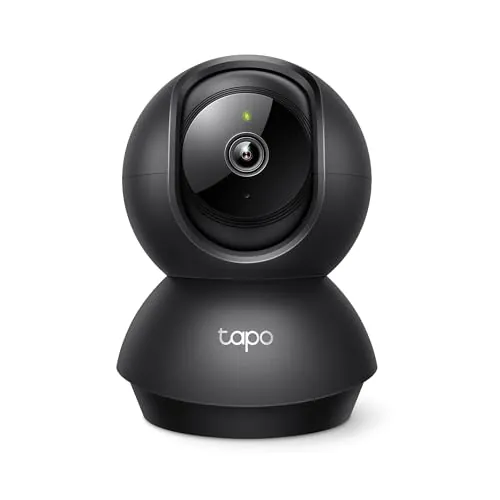
Tapo 1080P Indoor Pan/Tilt Wired Security Camera (C201)
- Pan/tilt coverage designed to scan across a room (360° horizontal and 114° vertical range stated).
Comparison
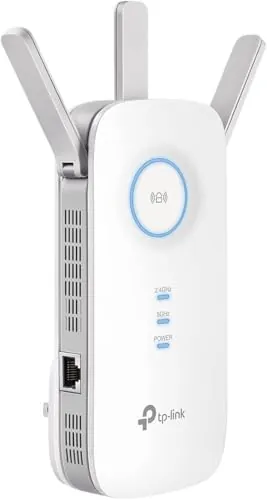
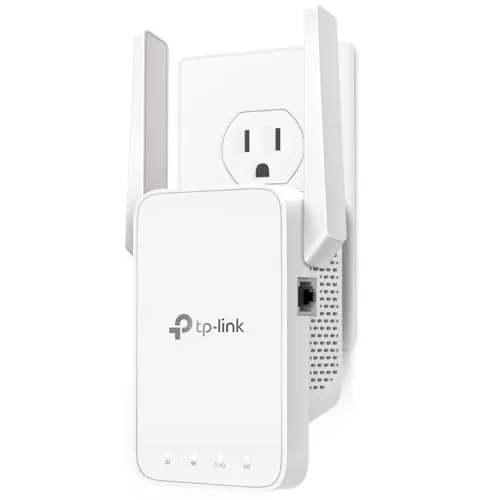
The Tapo C201 is a wired indoor pan/tilt security camera built for room monitoring with alerts, night vision, and local microSD recording or optional cloud storage. The TP-Link RE315 is a dual-band Wi-Fi extender designed to expand coverage into dead zones and can also provide a wired connection via its Ethernet port. If your main issue is monitoring what happens inside the home, the camera fits; if your issue is weak Wi-Fi for devices, the extender fits.
#1 Overall Winner
Contender
Choose the Tapo C201 if you want indoor video monitoring with pan/tilt coverage, alerts, and local recording without a required subscription. Choose the TP-Link RE315 if your priority is extending Wi‑Fi into dead zones, adding a wired port in a room, and keeping setup simple. If your camera struggles to stay connected, improving Wi‑Fi coverage with an extender may help.
Overall winner
Depends on your needs
| Feature | Tapo 1080P Indoor Pan/Tilt Wired Security Camera (C201) | TP-Link AC1200 WiFi Extender (RE315) | Winner |
|---|---|---|---|
| Product type / role | Indoor pan/tilt security camera | Wi‑Fi range extender | Depends |
| Primary use case | Baby/pet monitoring, indoor security, alerts | Eliminate Wi‑Fi dead zones, extend coverage | Depends |
| Video capability | 1080p video, night vision (up to 30 ft stated) | No video features | Tapo 1080P Indoor Pan/Tilt Wired Security Camera (C201) |
| Coverage / range | Pan/tilt view (360° horizontal, 114° vertical stated) | Coverage up to 1500 sq.ft (stated) | Depends |
| Alerts / detection | Motion/person/baby-cry notifications (stated) | Network management controls via app (no alerts stated) | Tapo 1080P Indoor Pan/Tilt Wired Security Camera (C201) |
| Storage options | Local microSD (up to 512GB stated) or optional cloud | Not applicable | Tapo 1080P Indoor Pan/Tilt Wired Security Camera (C201) |
| Voice assistant support | Works with Alexa and Google Assistant (stated) | Not smart home compatible (stated) | Tapo 1080P Indoor Pan/Tilt Wired Security Camera (C201) |
| Wired Ethernet port | Not stated | 1 Ethernet port (stated) | TP-Link AC1200 WiFi Extender (RE315) |
| Wi‑Fi bands | 2.4GHz Wi‑Fi (stated) | Dual-band 2.4GHz/5GHz (stated) | TP-Link AC1200 WiFi Extender (RE315) |
| Setup experience (buyer sentiment) | Often easy; some pairing/connectivity complaints | Frequently described as quick/easy via app | TP-Link AC1200 WiFi Extender (RE315) |
| Connectivity consistency (buyer sentiment) | Mixed; some frequent disconnections reported | Mixed; some drops/slowdowns reported | Tie |
| Portability / moving between locations | Compact camera; can be moved but needs power and Wi‑Fi | Compact wall-plug device; easy to relocate to find best signal | TP-Link AC1200 WiFi Extender (RE315) |
| Physical footprint | 3.4 x 3.4 x 4.6 in (stated) | 3.5 x 1.4 x 4.9 in (stated) | Tie |
| Value perception (buyer sentiment) | Very strong value for a feature-rich indoor camera | Very strong value as a budget extender | Tie |
In everyday home use, the Tapo C201 is about visibility and awareness: you place it in a room, aim it with pan/tilt, and rely on notifications and live view to check what’s happening. The RE315 is about connectivity and reach: you place it between your router and the weak-signal area to help phones, laptops, TVs, and smart devices stay connected more reliably.
If your day-to-day frustration is “I can’t keep Wi‑Fi in the back room,” the extender addresses it directly. If your concern is “I want to see and be alerted to what’s happening indoors,” the camera is the better match.
For core performance, the Tapo C201 generally delivers what indoor cameras are bought for: clear 1080p video, good room coverage via pan/tilt, and useful alerts for motion/person/cry detection. Reviews are especially strong on picture quality and night viewing, though a minority report disconnections or the camera stopping, which can undermine monitoring if your Wi‑Fi is marginal.
The RE315’s performance is judged by how well it extends coverage. Many buyers report stronger signal and better usability in weak areas, but there are also reports of connection drops or slow performance depending on placement and environment. In short: the camera performs well when connected; the extender performs best when positioned carefully.
Reliability feedback is mixed for both. For the Tapo C201, many owners report stable everyday use with strong video and alerts, but there are recurring mentions of Wi‑Fi disconnections and some reports that it can stop working, which is significant for a monitoring device. For the TP-Link RE315, many reviews describe it as reliable and stable once placed well, yet a subset reports connection drops, slowdowns, or intermittent issues (including at least one report involving access point mode and Ethernet dropouts). In both cases, reliability appears strongly influenced by home network conditions and placement.
The Tapo C201 is purpose-built for indoor security-style monitoring with motion/person/cry detection alerts, night vision, two-way audio, and a siren. The RE315 does not monitor anything; it can only influence security indirectly by improving Wi‑Fi coverage for connected devices (including cameras) in weak-signal areas. For direct monitoring and deterrence features, the camera is the clear choice.
For security and monitoring, the Tapo C201 is the only device here with direct capability: 1080p indoor video, night vision, motion/person/cry detection alerts, and a built-in siren, plus storage via local microSD or optional cloud. Reviews support strong picture quality and useful motion features, but also include some reports of disconnections or the device stopping, which can create gaps in monitoring.
The RE315 is not a monitoring product; its security relevance is indirect. If a camera drops due to weak Wi‑Fi, extending coverage can help improve the conditions that lead to missed alerts.
Neither product includes detailed safety system specs in the provided data, so safety considerations are mostly practical. The Tapo C201 is a corded indoor device; safe placement means managing the power cable to avoid trips and ensuring it’s mounted securely if wall/ceiling mounted. If you use the siren, consider how it might affect children or pets if triggered by alerts.
The RE315 is a wall-plug extender; safe use involves ensuring it’s not crammed behind furniture where heat could build up and avoiding unstable adapters or overloaded outlets. Because both run continuously, using them in well-ventilated, dry indoor locations is a sensible baseline.
Comfort benefits differ by role. The Tapo C201 can add peace of mind for caregivers and pet owners by letting you check a room, see in the dark, and use two-way talk, which several reviews describe as helpful when away from home. The RE315 improves “home comfort” in a different way by reducing frustration from weak Wi‑Fi in offices, bedrooms, or garages—especially important for streaming, studying, and work calls. If your comfort issue is anxiety about what’s happening in a room, the camera helps more; if it’s connectivity stress, the extender helps more.
Both products are generally described as easy to set up. The RE315 often gets especially consistent praise for quick installation and straightforward app guidance, with indicator lights helping you choose a good location. The Tapo C201 also has many “simple setup” comments, but there are more mentions of occasional Wi‑Fi pairing hassle and some lag when using two-way talk. For the smoothest initial setup experience, the extender has the edge; for day-to-day monitoring controls, the camera app experience is frequently described as easy to navigate.
The Tapo C201 is designed to sit on a surface or be mounted and then move its view via pan/tilt. That’s ideal when you want a single camera to cover a wide area, but placement matters if you don’t want it knocked out of position (one review mentions it can be easy to tip on a counter). The RE315 is a wall-plug unit with external antennas, designed for “set it and forget it” coverage in a hallway or central location; some users note it can block adjacent outlets on certain splitters due to its shape.
“Capacity” applies differently here. The Tapo C201’s practical capacity is its room coverage via pan/tilt and its local storage limit (up to a 512GB microSD card stated). The RE315’s capacity is network-centric, with stated coverage up to 1500 sq.ft and support for many connected devices. If you need more monitored room visibility from one device, the camera’s pan/tilt helps; if you need more Wi‑Fi reach across rooms, the extender’s coverage spec is the relevant capacity metric.
The RE315 is very space-efficient in terms of surfaces because it doesn’t take up shelf or countertop space—though it does occupy a wall outlet and may interfere with adjacent sockets on some splitters. The Tapo C201 uses a small footprint on furniture or a wall mount, but you’ll want to position it where it has a clear view and won’t be easily bumped (one review highlights this). For tight shelves and crowded countertops, the extender can be easier to accommodate; for rooms where you can dedicate a stable spot or mount, the camera fits well.
Noise is not a major deciding factor for either product in the provided data. The Tapo C201 can be used in bedrooms for baby or pet monitoring, and reviews focus more on video quality and connectivity than mechanical noise. The RE315 is a networking device with no noise-related feedback in the provided reviews. If quiet operation is essential, the more practical check is whether the camera’s alerts/siren settings and notification volume suit your household.
The RE315 is generally the simpler physical install: plug it into an outlet, use the app to configure, and then reposition if needed for best coverage. Many buyers report they’re up and running within minutes. The Tapo C201 installation depends on whether you mount it or place it on furniture. It includes mounting hardware (stated) and needs a power outlet plus Wi‑Fi setup; some users report initial Wi‑Fi connection can take a bit of trial and error. For fast, tool-free setup, the extender is typically easier; for a fixed, secure placement, wall-mounting the camera can be worth the extra step.
Neither listing provides detailed materials information, so build quality is mainly reflected in user impressions. For the Tapo C201, buyers often describe the hardware as good for the price, though long-term reliability feedback is mixed in places (some reports of it stopping). For the RE315, reviews commonly mention solid quality and a clean, compact wall-plug design, with some complaints tied more to stability than physical breakage. Overall, both read as budget devices with generally positive quality perceptions, but not flawless consistency.
Long-term durability is hard to prove from the provided data alone. The Tapo C201 gets positive comments about hardware quality for the price, but mixed reliability reports suggest some users experience device issues over time. The RE315 is lightweight and wall-plug based; reviewers often describe it as well-built and unobtrusive, though durability concerns show up more as stability/consistency complaints than physical wear. If durability is a priority, it’s worth considering return policies and whether you can place each device in a low-risk spot (camera not easily knocked; extender not overheated in a cramped outlet area).
Maintenance is more hands-on with the Tapo C201 because recording and monitoring settings may require periodic attention. If you use local recording, you’ll need to supply a compatible microSD card and manage storage behavior. You may also occasionally install updates (noted as easy in a review) and ensure the camera stays connected.
The RE315’s maintenance is mostly “set and check”: once it’s placed well, users typically manage it through the Tether app, and there’s no physical consumable like a filter or SD card. If you want the lower-maintenance device, the extender is usually simpler day to day.
Both are compact, but the RE315 is usually easier to move around while testing locations because it’s a wall-plug device—relocation is as simple as choosing another outlet. The Tapo C201 is also small enough to reposition and some users mention it’s easy to place or pack, but it’s tied to having a stable Wi‑Fi connection and a suitable surface (or a mount) where it won’t be knocked out of alignment. If you anticipate frequent repositioning, the extender is more convenient.
The Tapo C201’s feature set is focused on monitoring: pan/tilt viewing, 1080p video, night vision, notifications for different detection types, two-way audio, a siren, and local microSD recording with an optional cloud plan. The RE315’s features are networking-centric: dual-band extension, EasyMesh compatibility (with compatible routers), a signal indicator to help placement, app management, and an Ethernet port, plus an access point mode listed.
If you want detection, recording, and live monitoring features, the camera offers more relevant functions. If you want network expansion tools, the extender is the feature match.
Both products rely on apps for setup and daily management. The Tapo C201’s app experience is often described as straightforward, with controls for viewing, pan/tilt, and alerts; some users note lag during two-way talk, which affects the “feel” of interaction. The RE315 uses the TP-Link Tether app, which reviewers frequently call user-friendly and helpful for step-by-step setup and ongoing management. If you want the most consistently praised setup flow, the extender’s app feedback is slightly stronger; for monitoring controls, the camera app is central to daily use.
The Tapo C201 is clearly positioned as the more smart-home-friendly product: it works with Amazon Alexa and Google Assistant for viewing live video on compatible screens, and it relies on app-based controls for viewing, alerts, and settings. The RE315 is mainly a networking device; it uses the TP-Link Tether app for setup and management, but it’s not marketed as smart home compatible and doesn’t provide routines or voice-assistant features in the listing.
If you want smart-display viewing and camera-style alerts, the camera fits better. If you want a simple way to improve connectivity for multiple smart devices across the home, the extender is often the more helpful building block.
The Tapo C201 is the clearer fit for smart home setups where you want voice-assisted viewing: the listing states compatibility with Amazon Alexa and Google Assistant for live streaming to compatible screens. It also supports app-based alerts and settings that many users find easy to navigate.
The RE315 is a home-networking device with app management and EasyMesh compatibility (with compatible routers), but it is explicitly described as not smart home compatible in the provided specs. Its main “smart home” benefit is improving Wi‑Fi reach for devices that depend on a stable connection.
Automation is more relevant to the Tapo C201, which is designed around alert-driven monitoring (motion/person/cry detection notifications) and can be viewed via voice assistants on compatible screens. The RE315 focuses on network behavior rather than routines, although it does support EasyMesh roaming with compatible routers and has an access point mode listed. If you define automation as “actions triggered by detection,” the camera is the more automation-oriented device.
Connectivity is central for both, but in different ways. The Tapo C201 connects over 2.4GHz Wi‑Fi (stated) and relies on a stable network for consistent live view and notifications; buyer feedback is mixed, with some reporting frequent disconnections. The RE315 is designed to improve connectivity by extending your router’s signal and supports both 2.4GHz and 5GHz bands (stated). While many report strong results, others mention drops or slow performance, reinforcing that placement and environment matter.
There isn’t enough detailed energy or operating-cost data provided for a strict efficiency comparison. Practically, the Tapo C201 is a continuously powered device if you want always-on monitoring and recording, and ongoing costs may depend on whether you choose optional cloud storage. The RE315 is also a plug-in device intended to run continuously, and its “efficiency” is more about network effectiveness—placement can determine whether you get meaningful coverage improvement or end up with inconsistent performance.
Privacy and data handling matter more for the Tapo C201 because it captures indoor video and audio. The listing offers subscription-free local storage via microSD (which can reduce reliance on cloud storage) and an optional cloud plan for extended history and added benefits. If privacy is a concern, choosing local recording and carefully managing app access and account security are practical steps.
The RE315 is a networking device managed by app and doesn’t record content. Its privacy impact is mainly tied to network access controls and how you manage connected devices in the app.
Both products are widely seen as strong value, but the “best value” depends on your household problem. The Tapo C201 delivers a lot of camera functionality at a low buy-in—pan/tilt coverage, 1080p video, night vision, alerts, and the option to record locally without a subscription. Potential extra costs include a microSD card and any optional cloud plan.
The RE315’s value comes from improving usability of the internet you already pay for by extending coverage into dead zones, plus adding an Ethernet port where you need it. If weak Wi‑Fi is affecting work, streaming, or smart devices, the extender can be a high-impact purchase for the price.
Both products come from the TP-Link family of brands (Tapo is a TP-Link brand line; the extender is TP-Link branded), and both have very large volumes of buyer feedback. That scale helps validate that they’re mainstream options with ongoing app ecosystems. Trust signals in the provided data are mostly driven by customer experience: both have high overall ratings, but each has a minority of users reporting stability issues. If brand trust for you means consistency and support clarity, it’s worth checking documentation (for example, microSD compatibility guidance for the camera) and keeping firmware/apps updated.
Customer satisfaction is strong for both based on star ratings and very high review counts. The Tapo C201 gets frequent praise for picture quality, motion detection, easy setup, and value; recurring negatives include connectivity dropouts for some users and two-way audio delay. The RE315 is often praised for quick setup, noticeably improved coverage, and good value; the most common negatives are connection drops or slow performance in certain environments and occasional complaints when using access point mode. Overall sentiment suggests most buyers are happy, but neither device is immune to network-dependent issues.
The Tapo C201 and TP-Link RE315 aren’t direct competitors, so the right choice comes down to your household’s priority. The Tapo C201 is the better pick when you need indoor monitoring: it offers pan/tilt coverage, clear 1080p video, night vision, and local recording without a required subscription. Its main limitation is that connectivity and reliability can be inconsistent for some users, and two-way talk may feel delayed.
The TP-Link RE315 is the better pick when the problem is Wi‑Fi reach: it’s widely praised for easy setup and extending coverage, plus the Ethernet port is a practical bonus. Its main limitation is that performance can vary by placement, and a minority of users report drops or slowdowns. If your camera struggles to stay online, the extender may be the more impactful first purchase.
Overall winner
Depends on your needs
They solve different problems. The Tapo C201 is an indoor pan/tilt security camera for monitoring a room with alerts, night vision, and local or optional cloud recording. The TP-Link RE315 is a Wi-Fi extender designed to improve wireless coverage in weak-signal areas. If your goal is video monitoring, choose the camera; if your goal is fewer dead zones, choose the extender.
It can, if the camera is in a spot with weak Wi-Fi. Reviews for both products mention occasional connection drops in some homes, and extender placement can make a difference for reliability. The RE315 is designed to extend coverage rather than increase internet speed, so the best results usually come from placing it where it still receives a solid signal from the router.
No. The listing states it can record continuously to a microSD card (up to 512GB; card not included), which keeps it subscription-free for local storage. There is also an optional Tapo Care plan described for cloud storage with a 30-day video history and additional benefits. If you prefer avoiding monthly costs, local recording is the key option to check.
Both are commonly described as easy to set up, but the RE315’s plug-in extender workflow and app guidance are repeatedly praised for quick installation. The Tapo C201 is also often described as straightforward, though a few reviews mention Wi-Fi pairing can be a bit finicky in certain situations. Your home network environment and phone setup can affect both.
For small spaces with a specific need, it depends. The Tapo C201 suits small flats or rooms where a single pan/tilt camera can cover a wide view. The RE315 suits apartments with a weak bedroom or office signal and can improve coverage without moving the router. Both are compact; the RE315 plugs into a wall outlet while the camera needs a nearby power source.
The Tapo C201 listing states compatibility with Amazon Alexa and Google Assistant, allowing voice commands to view the live stream on supported screen devices. The RE315 listing does not position it as smart home compatible and focuses on Wi-Fi extension and management through the TP-Link Tether app instead. If voice viewing is important, the camera is the relevant pick.
For the Tapo C201, feedback is very positive overall, but some buyers mention frequent disconnections or the camera occasionally stopping, and a noticeable delay in two-way audio. For the RE315, many report strong coverage improvements, while a minority mention connection drops or slower performance depending on placement, and at least one review notes instability in access point mode.
Both are priced aggressively and are often described as good value, but “better value” depends on what you need. The Tapo C201 can deliver monitoring, alerts, and local recording at a low entry price, while the RE315 can extend Wi-Fi coverage and add an Ethernet option without replacing your router. Pick the one that solves your main household problem first.
Check our rankings and expert guides to find the best home lifestyle products for your goals.