#1 Overall Winner
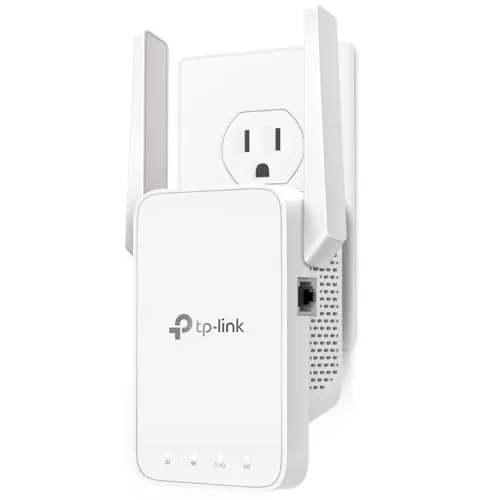
TP-Link AC1200 WiFi Extender (RE315)
- Very affordable way to reduce Wi‑Fi dead zones in a room or section of a home
Comparison
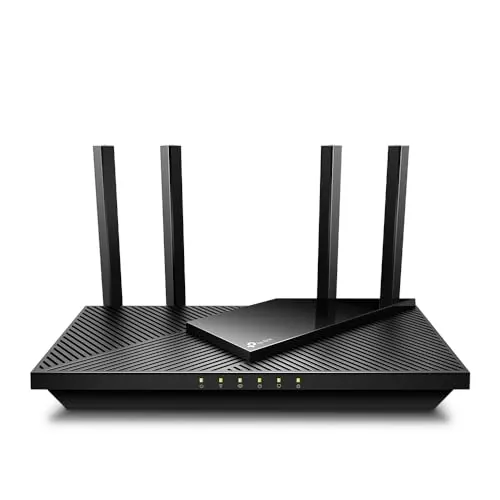
The TP-Link RE315 is a plug-in Wi‑Fi extender built to push your existing router’s signal into weak rooms, while the TP-Link Archer AX21 is a Wi‑Fi 6 router designed to be the main hub of your home network. If your biggest issue is dead zones, the RE315 is the lower-cost fix; if your router is outdated or limiting performance and control, the AX21 is the more complete upgrade.
#1 Overall Winner
Contender
Pick the TP-Link RE315 if you want the cheapest, simplest way to extend Wi‑Fi into one weak room and optionally wire a single device nearby. Choose the TP-Link Archer AX21 if you want to replace your router for Wi‑Fi 6 benefits, more control, and multiple gigabit Ethernet ports—especially in a multi-device household.
Overall winner
Depends on your needs
| Feature | TP-Link AC1200 WiFi Extender (RE315) | TP-Link AX1800 WiFi 6 Router (Archer AX21 V5) | Winner |
|---|---|---|---|
| Product type | Plug-in Wi‑Fi range extender | Main Wi‑Fi 6 router | Depends |
| Typical use case | Extend coverage to weak rooms | Whole-home Wi‑Fi foundation | Depends |
| Wi‑Fi generation (per listing) | Wi‑Fi 5 class (802.11ac) | Wi‑Fi 6 (802.11ax) | TP-Link AX1800 WiFi 6 Router (Archer AX21 V5) |
| Rated class speed (per listing) | AC1200 (867+300 Mbps bands) | AX1800 (1200+574 Mbps bands) | TP-Link AX1800 WiFi 6 Router (Archer AX21 V5) |
| Coverage claim (per listing) | Up to ~1500 sq ft (listing varies) | “Wide and reliable” coverage (no sq ft given) | Depends |
| Ethernet ports | 1 Ethernet port (listed 100 Mbps) | 5 ports total; gigabit LAN bandwidth listed | TP-Link AX1800 WiFi 6 Router (Archer AX21 V5) |
| Mesh / single-SSID options (per listing) | EasyMesh/EasyMesh-compatible; OneMesh mentioned | Easy Mesh mentioned | Tie |
| App management | TP-Link Tether app with cloud management, LED control, access control | TP-Link app; also manageable via browser UI | Depends |
| Security protocols (specs provided) | Not specified in provided specs | WPA/WPA2, WPA2-Enterprise, WPA3 | TP-Link AX1800 WiFi 6 Router (Archer AX21 V5) |
| Extra features | Access point mode; wireless statistics; access control | VPN server support (OpenVPN, PPTP); parental controls (listing) | TP-Link AX1800 WiFi 6 Router (Archer AX21 V5) |
| Setup effort | Typically quick plug-in setup; signal indicator for placement | Router replacement setup; modem required for most ISPs | TP-Link AC1200 WiFi Extender (RE315) |
| Reliability (buyer feedback summary) | Generally reliable; some report drops/slowdowns | Generally reliable; some report disconnections | Tie |
| Price | Lower-cost option | Higher-cost option | TP-Link AC1200 WiFi Extender (RE315) |
| Best value approach | Cheapest way to improve a dead zone | Better long-term upgrade if your router is limiting performance | Depends |
In everyday home use, the RE315 is best thought of as a “coverage patch”: you place it between your router and a weak area to make Wi‑Fi usable for work, streaming, or smart devices. The Archer AX21 is a “foundation device”: it determines the overall quality, settings, and wired connectivity of your home network. If your home struggles everywhere (or you want more control), start with the router; if only one area is weak, add the extender.
For raw network performance, the Archer AX21 has the advantage because it’s a Wi‑Fi 6 router designed to manage your entire network, with higher listed class bandwidth and better support for busy, multi-device homes (OFDMA per listing). The RE315 can improve performance where signal is weak by making connections more stable, but it’s still dependent on the quality and placement of your main router, and extenders can reduce throughput depending on where they’re installed. Buyer feedback reflects this: many see strong improvement, but some report slowdowns or drops.
Both products are generally viewed as reliable, but neither is immune to real-world network issues. The RE315 gets frequent praise for stability and for fixing weak rooms, yet a minority of users report connection drops, slow performance, or inconsistency—particularly when used in access point mode with Ethernet involvement. The Archer AX21 is widely praised for range and speed, but some buyers report internet disconnections. In both cases, placement, interference, and ISP line stability can be the deciding factors.
Both can play a role in home monitoring setups, but in different ways. The RE315 can be placed to improve Wi‑Fi reach to security cameras in garages, basements, or exterior-adjacent rooms (as some reviewers describe). The Archer AX21 can improve overall network stability and provides router-level security options in the provided specs (including WPA3), which may matter for a more connected home.
For monitoring and cameras, the RE315’s biggest benefit is simply extending usable Wi‑Fi to locations where cameras drop offline, and reviewers mention using it to reach devices in garages or exterior-adjacent areas. The Archer AX21 contributes more indirectly: it’s the central point that can offer stronger whole-home coverage and includes explicit security protocol support (WPA3 listed), which can matter in a home with many connected devices. If cameras are failing due to a dead zone, start with extender placement; if the whole network is shaky, start with the router.
No specific safety issues are highlighted in the provided data for either product, but practical precautions still apply. For the RE315, ensure it’s not forced into an overloaded outlet or tightly packed power strip where heat can build up, and place it where it won’t be bumped loose. For the Archer AX21, keep it in a well-ventilated location (some reviewers specifically mention this), away from heat sources and heavy dust buildup. If you use either near garages or basements, consider temperature and humidity limits where stated.
Comfort here mostly means day-to-day convenience and fewer frustrations. The RE315 can make a home office, bedroom, basement, or garage feel more “connected” by eliminating dead spots without a full network overhaul. The Archer AX21 can improve the overall feel of the home network—better range, more control, and stronger handling of multiple devices—so fewer tasks get interrupted when the network is busy. If you’re constantly troubleshooting, the router upgrade tends to be the more noticeable lifestyle improvement.
The RE315 is generally easier for most people because it’s a plug-in extender with guided setup in the Tether app and simple placement help via signal indicators. The Archer AX21 is also widely described as easy to set up, but replacing a router typically involves more steps (modem connection, new Wi‑Fi names/passwords, and reconnecting devices). Some users prefer configuring the AX21 through the browser interface rather than relying on the app.
The RE315’s design is all about convenience: small, wall-mounted, and easy to tuck into a hallway or outlet near the weak zone, with external antennas you can angle for coverage. The AX21 is more visible—larger footprint and four antennas—so placement tends to be on furniture in a central location for best results. If you want something discreet and out of the way, the extender is easier to “hide”; if you want central, full-home coverage, the router’s design is purpose-built for it.
Capacity depends on what you mean by “how much it can handle.” The RE315 lists coverage around the 1500 sq ft range and support for roughly 30–32 devices, which is practical for extending Wi‑Fi into a weak area. The Archer AX21 is positioned as a whole-network device with Wi‑Fi 6 capacity features (OFDMA per listing) and multiple gigabit ports, which typically suits more simultaneous devices and higher overall network demand. For one-room expansion, the extender’s capacity is often sufficient.
The RE315 wins for space efficiency because it mounts directly to a wall outlet and doesn’t take up shelf or desk space, although it can block adjacent sockets on some outlet splitters. The Archer AX21 needs a stable surface and some clearance for antennas and airflow, which is fine for most living rooms or offices but less ideal in very tight spaces or crowded media cabinets.
Neither device is likely to be a noise concern in typical use because they’re solid-state networking products with no large fans described in the provided data. In most homes, placement and ventilation matter more than sound—especially for the router, which may sit on a TV stand or shelf near living spaces.
The RE315 is typically easier to install because it’s a plug-in extender with a quick guide and app-led setup, plus a signal indicator to help you find a good outlet location. The Archer AX21 installation is still straightforward, but it’s a full router swap: you’ll connect it to a modem, configure your network, and reconnect devices. If you want the least disruptive change, the extender is simpler; if you’re comfortable doing a full upgrade, the router setup effort is usually worth it.
Both products are lightweight consumer networking devices, but their builds fit different jobs. The RE315 is a compact wall-plug unit with adjustable antennas; some users note it can block nearby outlets on certain splitters due to its shape. The Archer AX21 is a larger desktop router with four fixed antennas and is meant to sit on a shelf or TV stand. Feedback generally views both as solid for the price, with the router scoring slightly better for overall sturdiness.
There isn’t long-term component lifespan data provided, but expectations can be guided by design. The RE315’s wall-plug format may be moved or unplugged more often, which can be rougher on any plug-in device over time. The Archer AX21 is typically left in one ventilated spot, which can be gentler for long-term use if kept dust-free. Buyer sentiment suggests both hold up well for the price, with the router having slightly stronger overall indications of robustness.
Maintenance is low for both because there are no filters or consumables. The RE315 may need occasional re-positioning if your router location changes, and sometimes troubleshooting/reboots if you experience drops. The Archer AX21 may require periodic firmware checks (the listing suggests using the Tether app to ensure latest firmware) and basic upkeep like keeping it ventilated and dust-free. If you prefer “set it and forget it,” the winner depends on whether your network environment is stable.
The RE315 is more portable in day-to-day life because it’s small and wall-powered, making it easy to move between rooms (or even take on trips where a weak Wi‑Fi spot needs help). The Archer AX21 is portable in the sense that it’s lightweight for a router, but it’s still a desktop device that needs a modem connection and is not designed to be moved frequently.
The Archer AX21 offers more “router-grade” features in the provided information, including WPA3 security protocol support, multiple gigabit Ethernet ports, and VPN server support (OpenVPN/PPTP). The RE315 focuses on extender essentials: dual-band repeating, a signal indicator to help placement, app management, access control, and an access point mode. If you want deeper control over your network and wired expansion, the AX21 is more capable; if you want a straightforward dead-zone fix, the RE315’s feature set is usually enough.
Both products can use TP-Link’s Tether app, but the experience differs by role. RE315 owners frequently describe the app-guided setup as straightforward and helpful for placement and quick adjustments. For the Archer AX21, some users choose to avoid the app and manage the router through a browser interface instead, suggesting app satisfaction can vary. If you strongly prefer app-first management, the RE315 feedback is more consistently positive in the provided reviews.
The Archer AX21 is the more smart-home-friendly option in the provided data because it’s listed as smart home compatible and works with Alexa, and it’s built to handle many connected devices. The RE315 is listed as not smart home compatible, but it can still improve reliability for smart speakers, cameras, and other devices that sit in poor-signal areas by extending your existing Wi‑Fi coverage.
The Archer AX21 is better aligned with smart home setups because it’s listed as smart home compatible and works with Alexa, and Wi‑Fi 6 features can help when many devices are connected. The RE315 is not positioned as a smart home device itself, but it can still be very useful in smart homes by extending your existing Wi‑Fi to smart speakers, plugs, and cameras in weak-signal rooms. The practical choice depends on whether your issue is coverage in one spot (extender) or overall network capacity/control (router).
Automation is limited in the provided data for both, but the Archer AX21 offers more “system-level” control by being the router (for example, parental controls are listed). The RE315 focuses on staying connected and selecting a stronger path/connection automatically as you move around the home. If you want more advanced network rules and device management, the router is the better fit.
The Archer AX21 has the edge for connectivity flexibility: multiple gigabit Ethernet ports plus Wi‑Fi, making it easier to build a mixed wired/wireless home network. The RE315 offers Wi‑Fi extension plus a single Ethernet port, which is handy for a smart TV or desktop in a weak zone, but it’s listed at 100 Mbps and is more of a convenience port than a high-speed wired hub. Both products have mixed reports of disconnections for a minority of users.
The Archer AX21 is likely to be the more efficient choice for overall network handling because Wi‑Fi 6 is designed to reduce congestion and manage multiple devices more effectively (OFDMA per listing). The RE315 can be efficient for what it is—an inexpensive way to avoid running long cables—but as an extender it adds an extra wireless hop, which can reduce throughput and doesn’t “create” more internet bandwidth. If you’re trying to make the most of a fast plan across many devices, the router is the better foundation.
From the provided specifications, the Archer AX21 has clearer privacy/security detail because it lists WPA3 support (alongside WPA/WPA2 options) and includes router-level access controls via its admin interface. The RE315 includes access control features in the app, but its security protocol support isn’t specified in the provided data. If security protocol choice and router-level control matter most, the AX21 is the safer pick based on what’s explicitly stated.
The RE315 offers standout value if your goal is specific: eliminate dead zones at the lowest cost, with generally strong feedback for coverage improvement and easy setup. It’s also useful when you only need to wire one device in a weak room via its Ethernet port (with the limitation that it’s listed at 100 Mbps).
The Archer AX21 costs more, but it can be better value when it replaces an ISP rental router and becomes your network’s foundation, adding Wi‑Fi 6 capacity features, gigabit ports, and advanced options like WPA3 and VPN server support (per listing). The better value depends on whether you need a targeted fix or a full upgrade.
This is effectively a TP-Link vs TP-Link comparison, so brand trust is similar across both. Both listings highlight TP-Link’s security posture claims and long-standing networking focus, and both products have large review volumes with generally positive sentiment. Practical trust signals here are scale of user feedback and the availability of setup/support materials; the AX21 listing also provides clearer warranty/support details than the RE315 listing.
Both products have strong customer satisfaction with very high review counts and average ratings in the mid‑4s. RE315 buyers frequently praise easy setup, noticeable coverage improvement, and strong value, while the main recurring negatives are occasional drops and slower performance for some setups. AX21 buyers commonly praise speed, range, and upgrade value versus ISP routers, with mixed feedback around occasional disconnections and app-related preferences. In both cases, most households report a net improvement, but expectations should match your home layout and ISP stability.
The Archer AX21 listing includes clearer support and warranty information, including access to expert support and a stated multi-year warranty. For the RE315, warranty/support details are not clearly provided in the supplied data, so it’s harder to compare on paper. If warranty clarity and support access are priorities, the AX21 has the advantage based on the information available.
The TP-Link Archer AX21 is the better all-around pick if you’re building or upgrading a home network: it’s a Wi‑Fi 6 router with stronger core features, gigabit ports, and explicit security protocol support (including WPA3). Its main limitation is that a minority of users report disconnections, and setup is more involved because you’ll need a modem and may have to reconnect devices.
The TP-Link RE315 is the practical budget choice when the problem is coverage in one part of the home. It’s easy to set up, compact, and well-reviewed for eliminating dead zones, but it won’t necessarily increase speeds and can be inconsistent for some users depending on placement or mode. The right choice depends on whether you need a patch or a full upgrade.

Overall winner
Depends on your needs
They solve different problems. The TP-Link RE315 is best when your current router is acceptable but you have a dead zone and want a low-cost way to extend coverage. The TP-Link Archer AX21 is better if you want to replace your main router, get Wi‑Fi 6 benefits, and add multiple gigabit Ethernet connections for wired devices.
Yes, for most internet providers you’ll need a separate modem. The Archer AX21 is a router, not a modem-router combo. If you currently use an ISP gateway, you may be able to use it as the modem (or bridge it), but the exact setup depends on your provider and equipment.
Not necessarily. The RE315 is designed to extend coverage into weak-signal areas, which can make connections more stable and usable in those spots. However, extenders don’t guarantee higher speeds, and throughput can be lower than near your router depending on placement, interference, and backhaul signal strength.
The RE315 is typically the quickest setup because it plugs into a wall outlet and is meant to join an existing Wi‑Fi network. The Archer AX21 is still considered easy to set up, but replacing a router usually takes more steps (modem connection, network names/passwords, and reconnecting devices).
The Archer AX21 is generally the better fit for wired setups because it offers multiple gigabit Ethernet ports. The RE315 includes a single Ethernet port, but it’s listed as 100 Mbps, which can limit wired speeds. The extender port is still useful for stability in a weak Wi‑Fi room.
The Archer AX21 is designed for higher device capacity and reduced congestion with Wi‑Fi 6 features like OFDMA (per listing). The RE315 can help add coverage for more devices in a weak area, but it won’t upgrade the underlying capabilities of an older router the way a Wi‑Fi 6 router replacement can.
Both listings and review summaries mention that a minority of buyers report connection issues. With the RE315, some users report drops or slower performance (and some report instability in access point mode). With the Archer AX21, some users report internet disconnections. Placement, firmware, and ISP line stability can affect results.
For small spaces where the current router is mostly fine, the RE315 is a compact, low-cost way to fix a single weak room. If your apartment’s router is old or limited and you want better overall performance and control, the Archer AX21 can be a stronger foundation—especially if you can place it centrally.
The Archer AX21 lists compatibility with Alexa and includes smart-router style controls, which can be helpful in smart homes. The RE315 is primarily a coverage extender and is listed as not smart home compatible, but it can still improve Wi‑Fi reach to smart devices that struggle in low-signal areas.
Check our rankings and expert guides to find the best home lifestyle products for your goals.